
Of course there is a print button in all Microsoft Office programs and even in Office Web App!
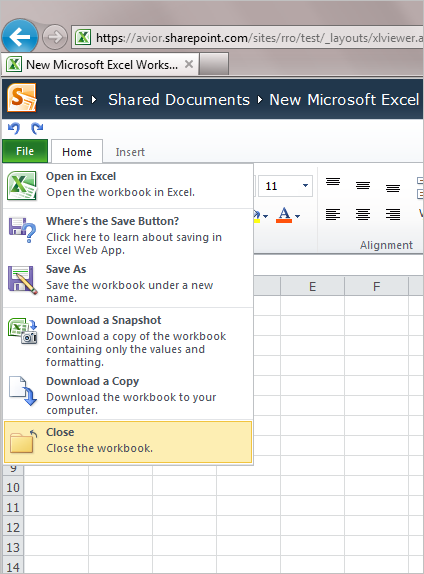
Well I thought so… But there is no print functionality in Office Excel Web App in the SharePoint Online.
The hunt begins:
Searching Microsoft Office Support
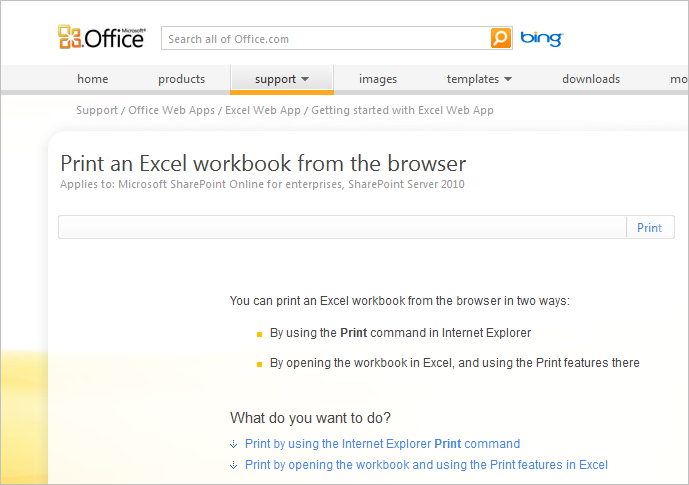
In search of the holy print button I found this at http://office.microsoft.com/en-us/web-apps-help/print-an-excel-workbook-from-the-browser-HA010379748.aspx
There is a nice headline saying “Print an Excel workbook from the browser”, sounds good but it only gives us two possibilities:
- By using the Print command in Internet Explorer
- By opening the workbook in Excel, and using the Print features there
Well, nothing new there!
Using the Browsers print button will give you a print with the toolbar on, not very useful. If using Excel on the computer is an option then this is for now the best choice.
Let’s take a look at the services offered with Office 365
Downloading and reading the Microsoft Office Web Apps Service Description.docx at http://www.microsoft.com/download/en/details.aspx?id=13602 gets me no further. Print is offered for Word and PowerPoint Web Apps but not in Excel.
SkyDrive has it
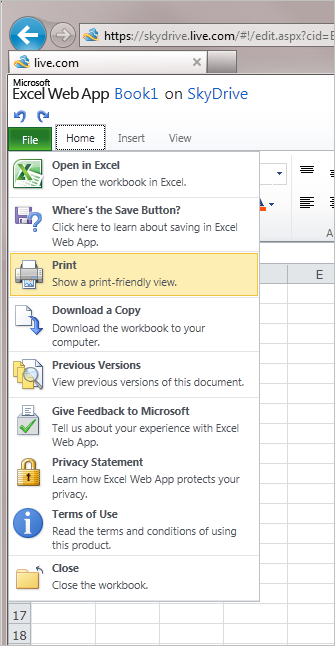
I was pretty surprised when I spotted the print button at the SkyDrive Excel Web App.
Comparison of the two Excel Web Apps in SkyDrive and Office 365:
| SkyDrive | Office 365 |
 |
 |
The print in Excel Web App in SkyDrive opens a new window with the workbook content and gives you the choices to print the active sheet or print selection.
But why not this functionality in Office 365?
Not coming soon
Reading the smoke signals from mount Redmond, the print in excel is nowhere in the recent roadmap for Office 365, telling me that we have to wait a couple of month, at least.